

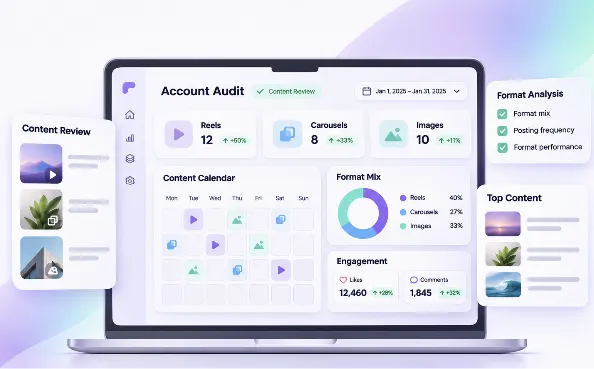
An Instagram profile can look active while important problems go unnoticed. The bio may contain outdated information, popular posts may be exceptions rather than typical results, and the content may no longer match what followers want to see.
An Instagram account audit helps identify these issues using profile information, recent posts, and engagement data. The following ten checks cover what to review, which figures to record, and how to turn the findings into a short action plan.
Set the Goal and Scope of Your Instagram Account Audit
Choose one main objective before reviewing the account, such as improving engagement, updating profile information, or checking content performance.
For an account you manage, use Instagram Insights alongside publicly visible information. Insights provides available reach, audience, and post-performance data. When auditing another public profile, the review is limited to published content, follower counts, and visible interactions. Private content and owner-only metrics aren't available without permission.
Use the same 30-day review period for all content checks. Record the dates and follower count at the beginning of the audit to make future comparisons more consistent.
1. Profile Discoverability
Begin with the account details that help people find and recognize the profile. Check the following:
- Username: Clear, memorable, and consistent with the account's identity.
- Name field: Contains the brand, creator name, or relevant specialty.
- Profile photo: Recognizable at a small size.
- Category: Accurately describes the business or creator.
- Visibility: Public when reaching new audiences is the goal.
Search for the account by its name and check whether similar profiles create confusion. Avoid changing an established username unless there's a clear reason. Record missing or inaccurate information and make those corrections before changing the content strategy.
2. Bio and Link
The bio should explain what the account offers and direct visitors to the next step. Keep the description specific, with relevant details about products, services, or the account's main subject. Review the contact information, location, and any claims about qualifications or achievements. Remove outdated details and unnecessary promotional language.
Open the profile link and confirm that its destination matches the bio. Check for expired offers, broken pages, and links that lead to unrelated content. The destination should also work properly on mobile. If the account has several links, place the most relevant destination first. Important information shouldn't be buried behind unnecessary steps.
3. Highlights and Pinned Content
Pinned posts and Highlights should give visitors access to current information without requiring them to search through the feed. Review pinned posts for outdated announcements, discontinued products, and expired promotions. Replace content that no longer reflects the account's priorities.
For Highlights, check the titles, organization, and information inside each section. Product details, instructions, prices, and contact information should be accurate. Remove duplicate Stories and content that no longer serves a purpose. Public Highlights can be reviewed, but detailed performance data requires authorized access. Our guide to Instagram Story analytics explains the metrics available to account owners.
4. Content Pillars
Review posts published over the last 30 days and organize them into three to five main themes. This shows which subjects receive the most attention and where the account has content gaps.
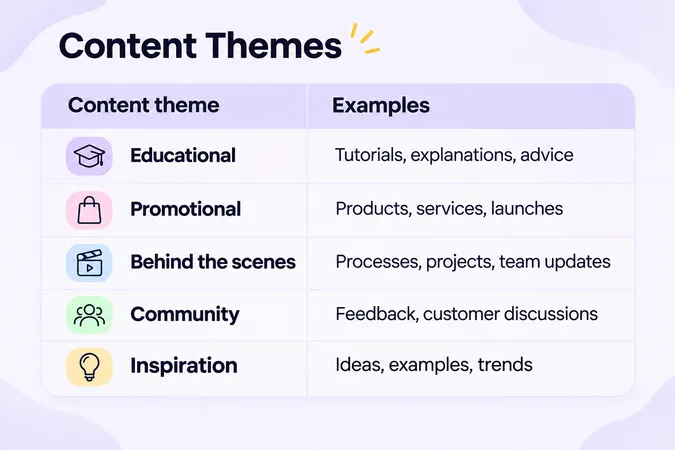
Count the posts in each category and compare their engagement. A theme that appears frequently but consistently attracts little response may need a different approach.
Also identify subjects followers regularly ask about but rarely see covered. These provide a stronger basis for new content than adding topics simply to create an even distribution.
5. Format Mix
Count the Reels, carousels, and single-image posts published during the review period. Calculate the percentage represented by each format. For example:
| Format | Posts | Share |
| Reels | 8 | 40% |
| Carousels | 7 | 35% |
| Images | 5 | 25% |
Next, compare typical engagement within each format. Use median likes and comments rather than judging the entire category by its most popular post. Consider the purpose of each format as well. A carousel explaining a complex subject may generate more discussion than a short video, even with fewer likes.
If a format takes substantial effort but repeatedly produces weak results, consider testing another approach before increasing its publishing frequency.
6. Posting Rhythm
Review publication dates and count posts by week. Monthly totals can hide irregular activity, such as ten posts during one campaign followed by two weeks without updates. Record weekly frequency and identify unusually long gaps. Compare these periods with changes in visible engagement, while avoiding assumptions about cause and effect.
There's no universal posting schedule. The right frequency depends on available resources, content quality, and the account's purpose. A schedule that requires rushed or repetitive content is unlikely to be useful. Choose a realistic frequency and assess whether it produces consistent results over several review periods.
7. Visible Engagement
For this part of the Instagram profile analysis, record visible likes and comments for recent posts. Keep Reels, carousels, and images separate when comparing typical results. Calculate the median likes and comments per post. The median prevents one unusually popular publication from distorting the overall picture. Engagement rate by followers provides an additional measure:
Engagement rate (%) = (Likes + Comments) ÷ Followers × 100
For example, a post with 180 likes, 20 comments, and 5,000 followers has a 4% engagement rate.
When comparing engagement across several posts, use the same calculation method throughout the audit. Record the follower count used for each calculation and keep posts from different formats separate. This makes the results easier to compare and helps prevent one unusually successful post from influencing your assessment of the account's overall performance.
For additional calculation methods, see how to calculate Instagram engagement rate.
This formula doesn't measure reach, saves, or conversions. Hidden engagement counts should be marked as unavailable rather than recorded as zero.
8. Comment Quality
Comment totals show activity, but the content of those comments provides more context. Review discussions under several posts, including those with high and low engagement. Identify recurring questions, requests for clarification, complaints, and topics that lead to longer conversations. Check whether the account answers relevant questions and provides accurate information. Repeated requests for the same details may indicate that something is missing from the bio, Highlights, or existing posts.
Avoid treating short or repetitive comments as proof of fake engagement. Public comments alone can't establish whether an account is authentic. Record the most common discussion topics and use them to identify opportunities for clearer content.
9. Top and Bottom Posts
Select the three strongest and three weakest posts based on a consistent engagement measure. Compare similar formats published within the same period. Review the subject, opening visual, caption, publication date, and comment quality. Look for patterns that appear across multiple posts rather than isolated successes.
Include the number of days each post has been published. A post uploaded yesterday shouldn't be compared directly with one that has collected interactions for several weeks. For a fairer comparison, review posts after a similar amount of time and separate promotional campaigns from regular content whenever possible.
Strong posts may repeatedly address a particular topic or present information in a format followers respond to. Weak posts may cover repetitive subjects or attract little discussion. Don't assign a specific cause based on engagement figures alone. A popular Reel doesn't prove that its music or publication time produced the result.
If you're comparing these findings with other public accounts, use a consistent method for Instagram competitor analysis.
10. Prioritized Action Plan
Turn the audit findings into three changes for the next review period. Rank each by expected impact and required effort.
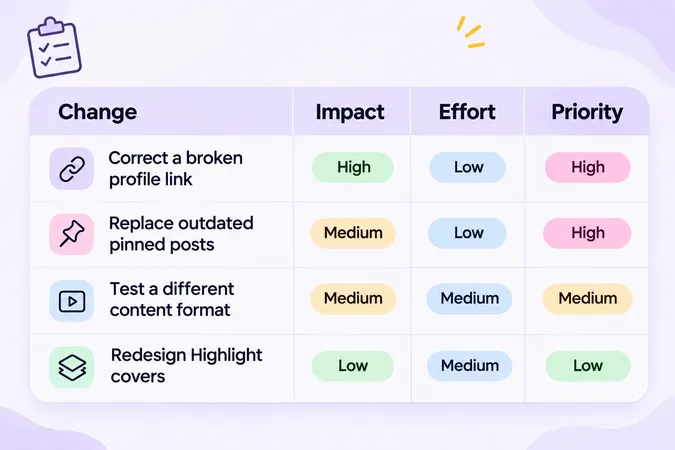
Start with changes that solve clear problems. For content experiments, define the measurement in advance, such as median comments or engagement rate. Assign an owner, set a deadline, and record the initial results. Avoid changing too many variables at once, since that makes it harder to understand which adjustments helped.
Audit Results and Next Steps
Use this Instagram audit checklist to record evidence and keep the improvement plan organized.
← Swipe left or right to view the full table →
| Check | Evidence | Status | Priority | Owner | Next action |
|---|---|---|---|---|---|
| Profile discoverability | Name, username, image | ||||
| Bio and link | Description, link destination | ||||
| Highlights and pinned posts | Content accuracy | ||||
| Content pillars | Themes, post counts | ||||
| Format mix | Posts by format |
Mark each item as Good, Needs Work, or Not Checked. Include exact figures, dates, or examples in the evidence column rather than general impressions.
Keep previous scorecards for comparison. Recording follower counts at regular intervals can also help track Instagram follower growth, although public figures won't explain the reasons behind changes.
Final Thoughts
A useful Instagram audit identifies specific problems, supports findings with evidence, and produces a manageable improvement plan. Profile details, content topics, format distribution, and engagement should all be reviewed using consistent criteria.
Keep public observations separate from owner-only analytics. Select three changes, assign responsibility, and measure the results during the next audit. This creates a repeatable process without spending time on unnecessary reports or changes.
FAQ
Once a month is a good starting point. Check your profile information, recent posts, and audience interactions. Every three months, take a closer look at longer-term changes to see what needs improvement.
Yes, as long as the profile is public. You can review published posts, follower counts, likes, comments, and posting frequency. However, detailed information about reach, saves, and audience demographics is only available to authorized account users.
Compare likes and comments across posts published during the same period. Look at Reels, carousels, and images separately, and pay attention to topics that consistently attract responses. Avoid judging performance based on one unusually popular post.